







 Download on the
GitHub Releases
Download on the
GitHub Releases
Copilot Stats is a native macOS menu bar app that helps you keep an eye on GitHub Copilot premium request costs.
Features
- View Copilot usage costs in dollars
- Browse usage by month
- See daily costs across the full month
- Launch automatically at login
- Securely store your GitHub token in the macOS Keychain
Installation
Download the latest version from GitHub Releases.
You can also explore the source code and report issues on GitHub.
 Download on the
Mac App Store
Download
14-days trial
Download on the
Mac App Store
Download
14-days trial
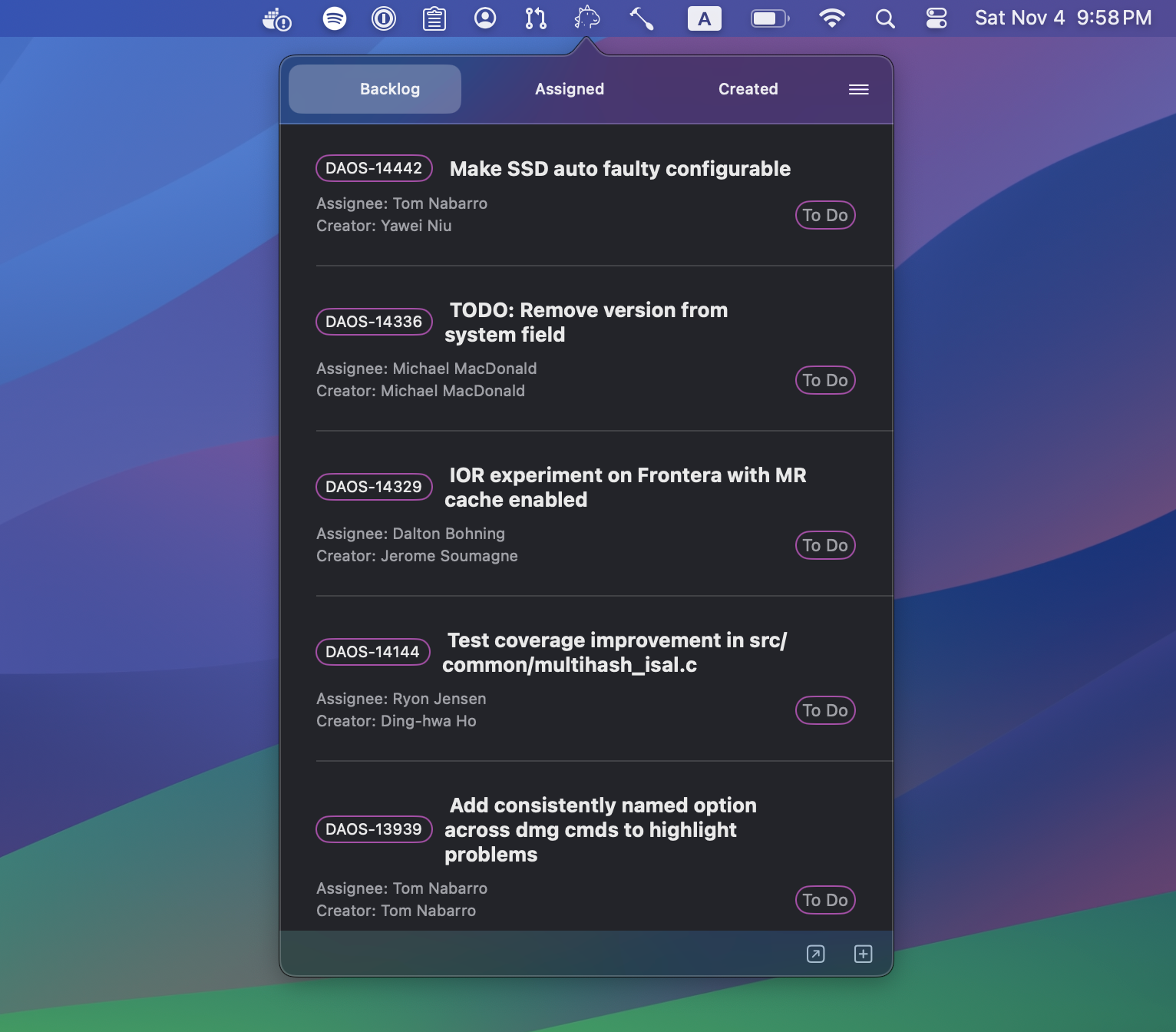
Access your Jira tickets with a single click from your menu bar!
This menu bar application streamlines your Jira interactions, making it easier to manage your tasks. You can create customized views to swiftly access issues from various projects, statuses, or any other category you prefer.
For instance, you can set up a tab for issues assigned to you, another for the issues you’ve created, enabling you to monitor their progress. Additionally, you can create a dedicated tab for managing project backlogs, whether it’s for a single project or multiple projects.
Step-by-Step Guide to Create a JQL Query
-
Log In and Access the Search Interface:
Sign into your JIRA Cloud account. Click on “Issues and filters” in the left sidebar or select “Search for issues” in the dropdown if you are in a different section.
-
Switch to JQL Search:
In the search interface, you might see the basic search options by default. Look for a switch or link to Advanced Search and click it. This will open the JQL search interface.
-
Begin Crafting Your Query:
You’ll see a text field where you can enter your JQL query.
-
Understand Basic Syntax:
JQL queries are structured as
field operator value. For example,status = "Open".fieldrefers to the issue attribute (like status, summary, assignee).operatoris how you want to compare the field (e.g., =, !=, >, <).valueis what you are comparing the field to (like a specific status name, a user, etc.).
-
Use Logical Operators for Complex Queries:
Combine different criteria using operators like AND, OR, and NOT. E.g.,
project = "MYPROJECT" AND status = "Open". -
Leverage Functions and Keywords:
JIRA Cloud also supports various functions like
currentUser()or dates likestartOfDay(). -
Execute the Query:
After typing your query, run it by either pressing Enter or clicking the Search button.
-
Refine Your Query as Needed:
Based on the results, you might want to refine or adjust your query.
-
Use created query in GojiBar
Copy the query and paste it under Preferences -> Tabs in GojiBar.
Example JQL Queries
Find issues assigned to you in a specific project:
project = "MYPROJECT" AND assignee = currentUser()
Search for recently updated high-priority issues:
priority = High AND updated >= -1w
Issues reported by you that are still open:
reporter = currentUser() AND status != Closed




Download on the
GitHub Releases
 tap: menubar-apps/menubar-apps
jirabar
tap: menubar-apps/menubar-apps
jirabar
Native macOS menubar application to show Jira issues in your menu bar:

Installation
Download and install the latest release. Then start the application, open preferences and setup your jira host, credentials and a query:

Download on the
GitHub Releases

Native macOS menubar application for GitLab users to stay on top of your workflow! Effortlessly track merge requests, issues, and to-dos—all in one convenient place:
Features
- Instantly see merge requests where your review is needed.
- Upgrade to unlock full access to your created and assigned merge requests, GitLab issues, and to-do items.
- Keep your tasks and code reviews organized and never miss an important update.
- Connects directly to your GitLab account, ensuring your data stays private and up to date.
-
Perfect for solo developers or teams to boost productivity and keep GitLab projects moving forward.
- shows merged pull requests and merge activity;
- for each merge shows title, number, project, author, number of approvals, number of added/deleted lines and how long ago the merge happened;
- show check suites or check runs information with links to the corresponding builds.
Download on the
Mac App Store
 Check free version
OctoSpace Lite
Check free version
OctoSpace Lite
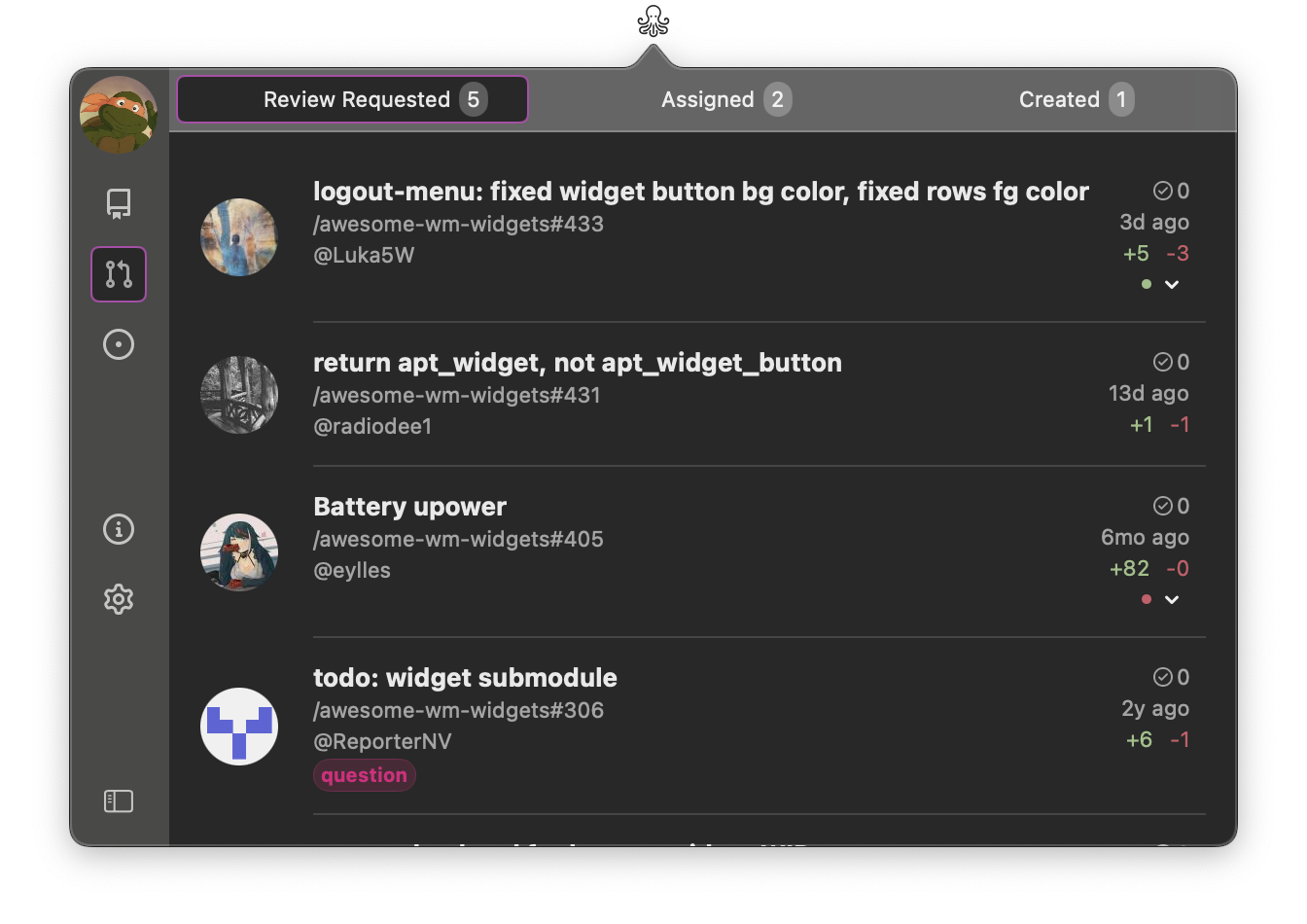
With this app you’ll be able to quickly access github’s pull requests, issues and repositories of any organization you’re part of.
Ideal for:
- Developers seeking a more integrated GitHub experience on their macOS.
- Project managers who need to keep track of multiple GitHub organizations simultaneously.
- GitHub power users wanting to optimize their workflow.
- Contributors to open-source projects who need to stay updated on various repositories.
Features
- simple setup - just generate an access token and paste it in the app.
- built in SwiftUI, for better performance, theming and integration with macOS.
- for pull requests you can setup:
- what type of pull requests to view: review requested, assigned and/or created.
- status checks - is a code quality feature of GitHub’s pull requests, which is based on external processes, like CI pipeline. There are two types of status checks: check and commit status. OctoSpace supports both of them.
- for issues you can setup:
- what type of issue to view: assigned, created and/or mentioned.
Upcoming features
- add search to the repositories view
- add github projects view
- improve issues view to include information about projects, related to the issue
- add team members view
- suggest your feature
If you liked the app, please leave a review. In case you didn’t like it, please submit an issue, I’ll be happy to fix bugs, implement missing functionalities or work on new features.
Download on the
Mac App Store
Check full version
OctoSpace
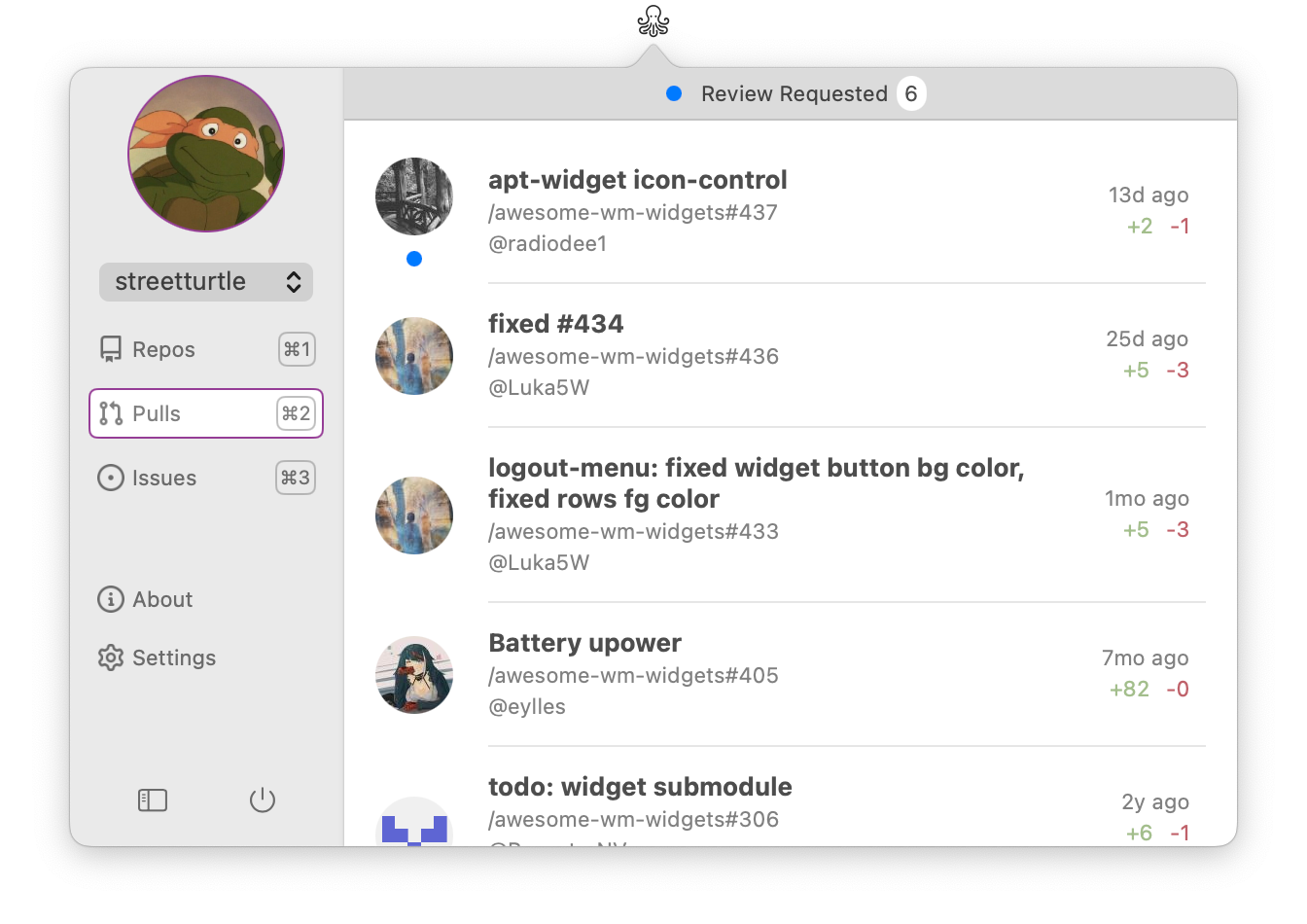
You GitHub companion one click away!
Features
- simple setup - just generate an access token and paste it in the app.
- built in SwiftUI, for better performance, theming and integration with macOS.
If you liked the app, please leave a review. In case you didn’t like it, please submit an issue, I’ll be happy to fix bugs, implement missing functionalities or work on new features.




Download on the
Mac App Store
Download on the
GitHub Releases
tap: menubar-apps/menubar-apps
pullbar
Native macOS menubar application to show GitHub Pull Requests in your menu bar! Keep track of created, assigned and review requested Pull Requests:

Features
- shows assigned, created and review requested pull requests;
- for each pull request shows title, number, project, author, number of approvals, number of added/deleted lines and how long ago this PR was created:

- show check suites or check runs information with links to the corresponding builds.
Installation
There are 3 ways of installing the application:
- Mac App Store
- Homebrew:
brew tap menubar-apps/menubar-apps brew install pullbar - Download from github releases
Download on the
Mac App Store
Download
14-days trial

Easily stay in the loop with your GitHub pull requests using PullBarPro. This macOS menu bar application provides convenient access to real-time updates on your pull requests. With PullBarPro, you’ll have a quick access to Pull Requests which you have to review, or follow the progress of created or assigned Pull Requests.
Pull Request Details
For each PR, view the title, repository, PR number, author’s name, and optionally the author’s avatar. Also available are the number of reviews, number of additions and deletions, and optionally, the status checks.
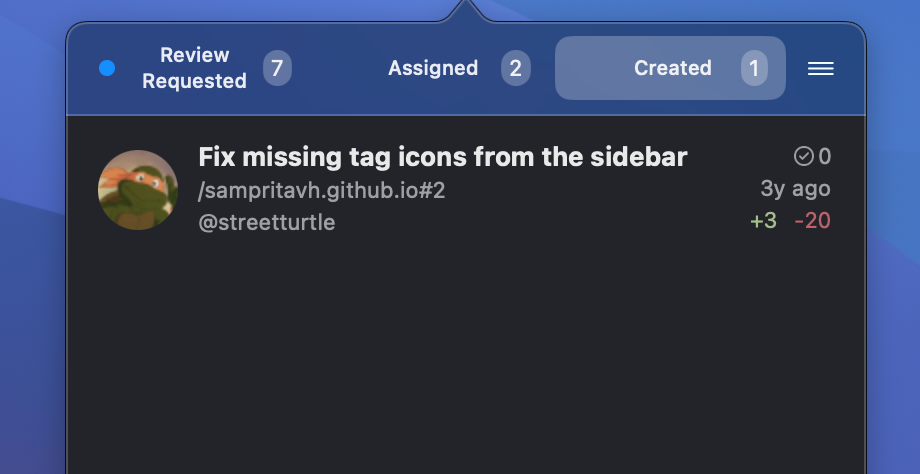
Tabs
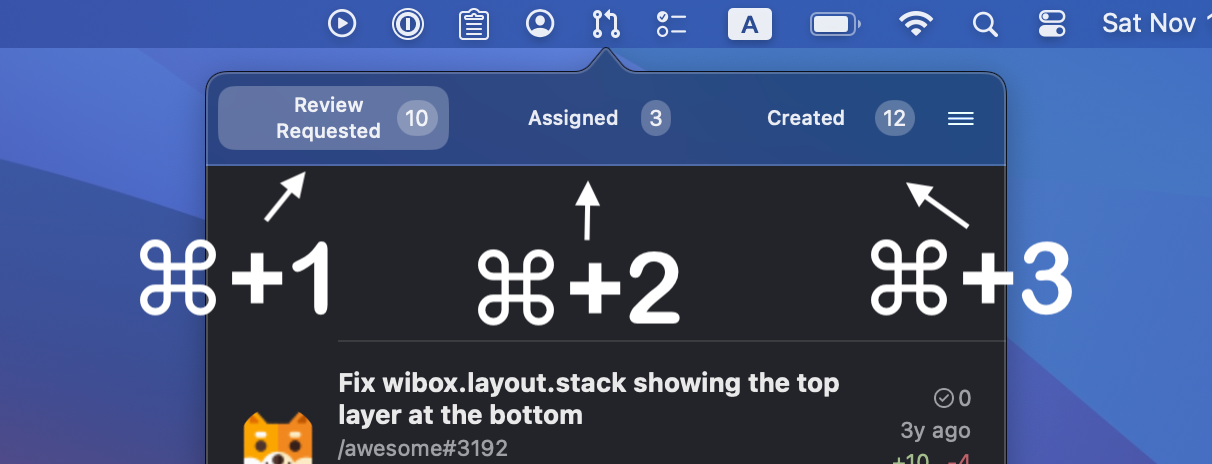
You can enable up to three tabs with saved searches for assigned, created and review requested PRs. The blue dot on the tab indicates that there are unseen changes in some PRs of this type.
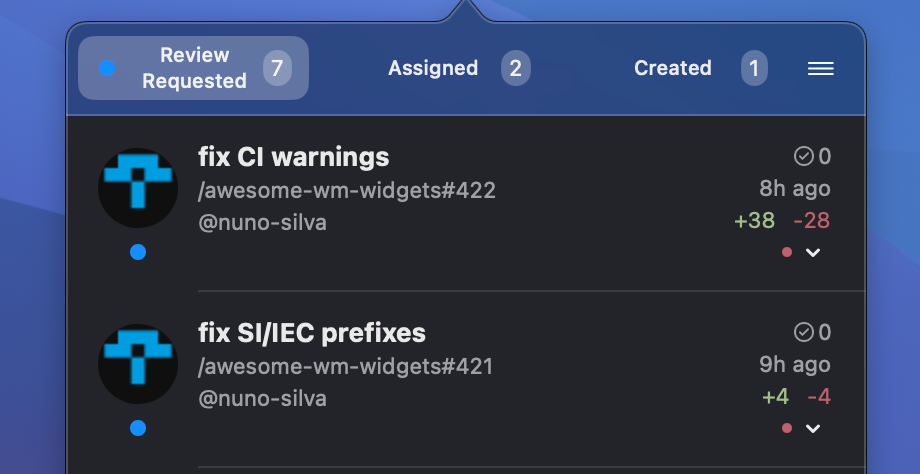
Keyboard Support
You can assign a keyboard shortcut to toggle the app. Additionally, while the app is open, you can switch between tabs using ⌘cmd + 1 through ⌘cmd + 3, depending on the number of enabled tabs.
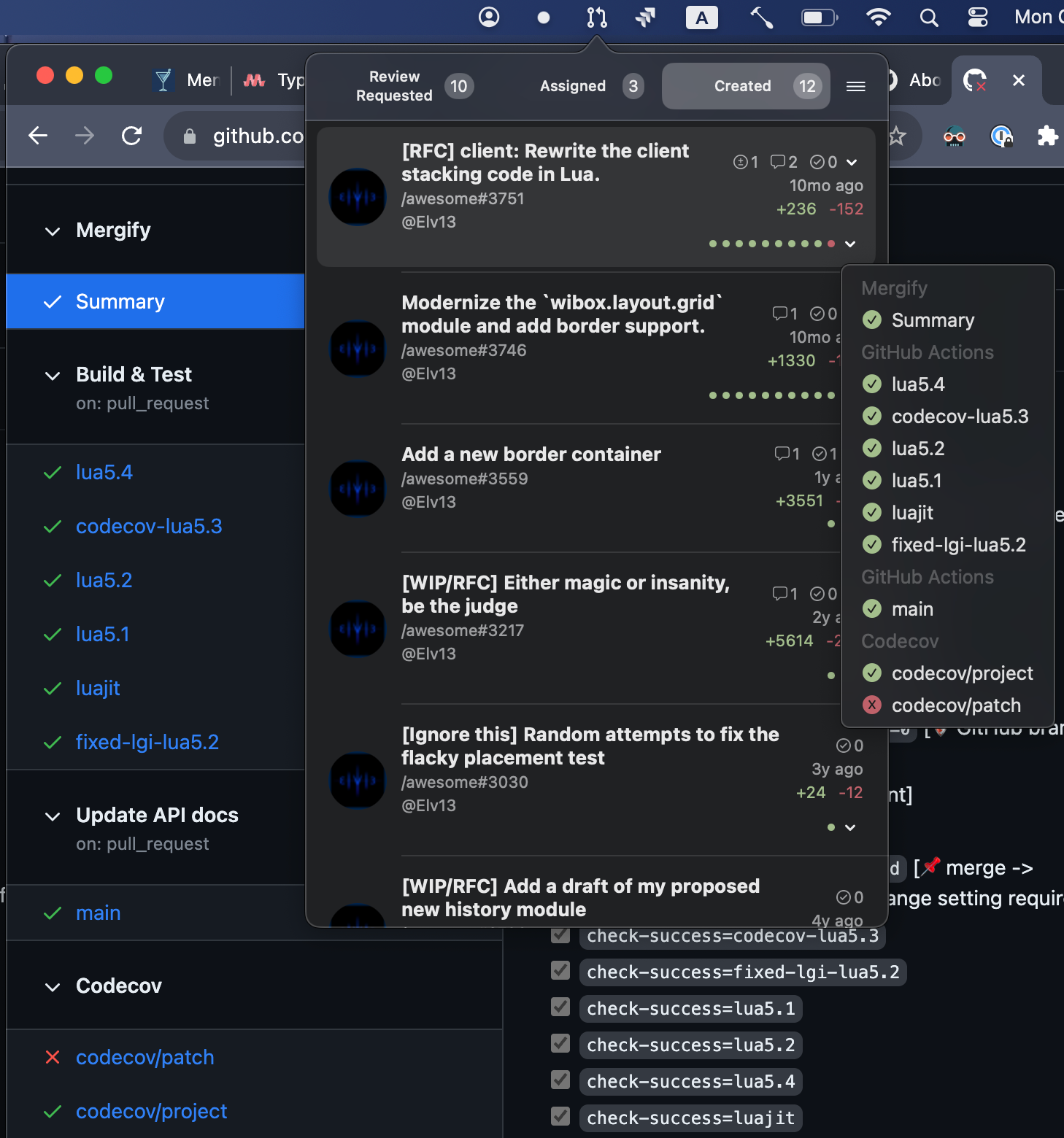
Build: Checks
Status checks is a code quality feature of GitHub’s pull requests, which is based on external processes, like CI pipeline. There are two types of status checks: check and commit status. PullBar supports both of them.
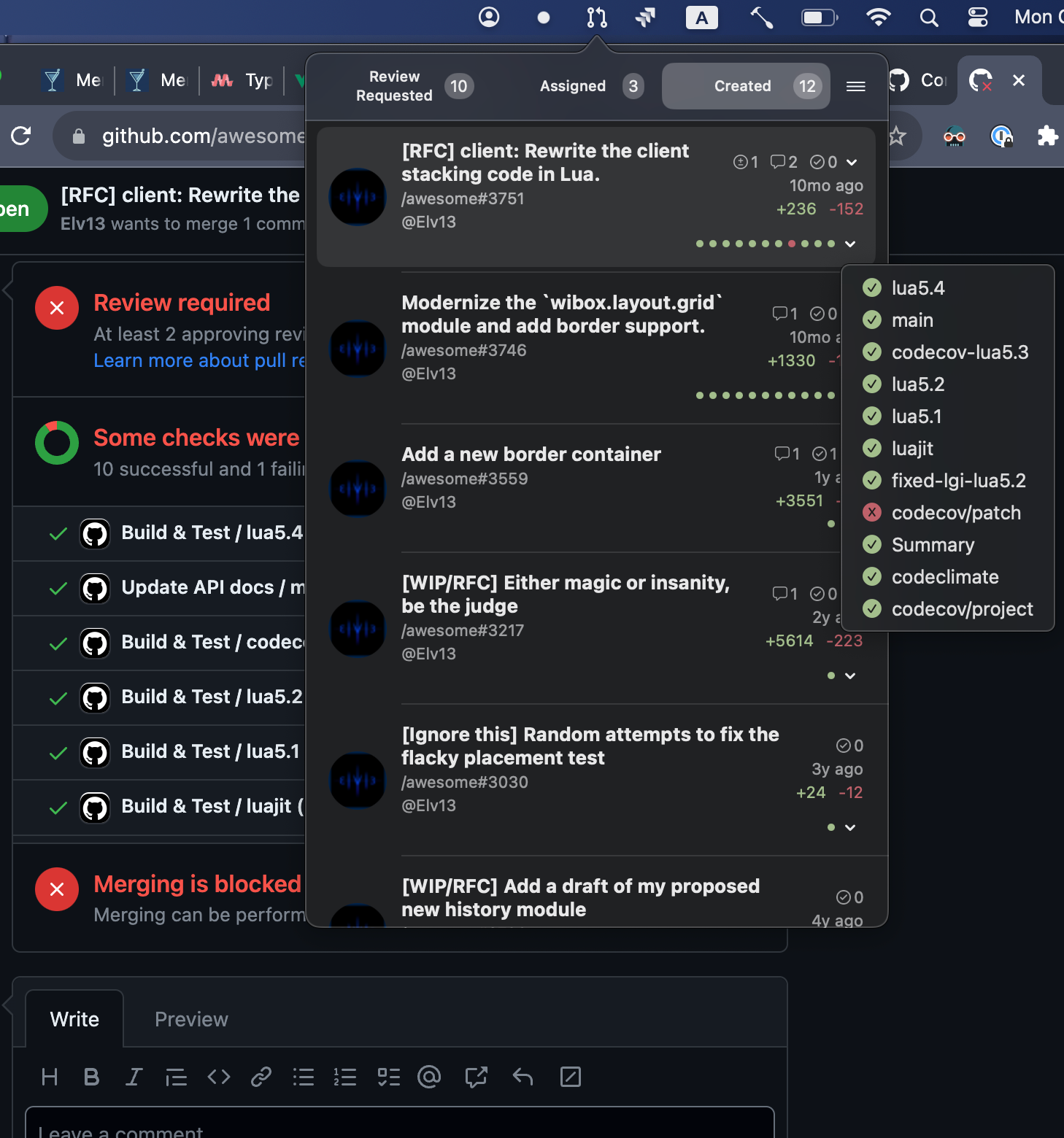
Build: Commit Status
Status checks is a code quality feature of GitHub’s pull requests, which is based on external processes, like CI pipeline. There are two types of status checks: check and commit status. PullBar supports both of them.
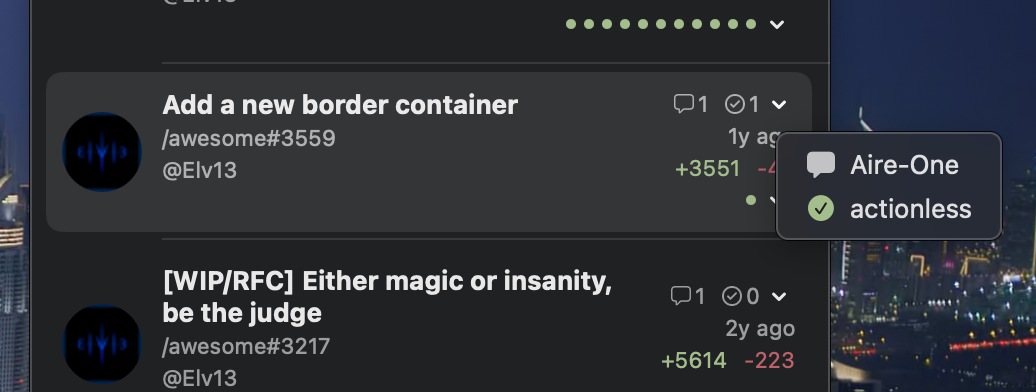
Reviews
For each pull request you can find number of approvals, comments or change requests, with the reviewer’s name and a direct link to the corresponding review.
Features
- Pull Request Details with title, repository, number, author, reviews, additions/deletions, status checks
- Up to three customizable tabs for assigned, created, and review requested PRs
- Keyboard shortcut support for quick toggling and tab switching
- Build status checks (Checks & Commit Status)
- Review information with approvals, comments, and change requests




Download on the
Mac App Store
Download on the
GitHub Releases
tap: menubar-apps/menubar-apps
streakbar
Native macOS application to show the GitHub contribution chart in your menu bar!
Features
Highly customizable: choose a day or a week view, color theme, transparency of empty days, borders:
Installation
- Homebrew:
brew tap menubar-apps/menubar-apps brew install streakbar - Download from github releases
 Download on the
Mac App Store
Download on the
App Store
Download on the
Mac App Store
Download on the
App Store

 ### App Store Connect stats in your menubar!
SwiftyStats is a lightweight menubar macOS application designed for indie app developers. It provides easy access to your recent installation data from App Store Connect, all from the convenience of your Mac’s menubar.
### Getting Started:
Link your Apple App Store account and authorize access via your Admin account on App Store Connect.
Generate an API key with Admin privileges on the Integrations page to ensure seamless communication between SwiftyStats and your account.
All credentials are securely stored in your Mac’s Keychain. SwiftyStats does not share any data with third parties; it only interacts directly with the App Store Connect API.
### Important Note:
SwiftyStats utilizes the Sales Report API for its data, so there may be slight discrepancies compared to the Analytics and Trends pages on App Store Connect due to report availability.
Requirements:
- Membership in the Apple Developer Program
- At least one app distributed on the App Store
- An App Store Connect account with permissions to create API keys
### App Store Connect stats in your menubar!
SwiftyStats is a lightweight menubar macOS application designed for indie app developers. It provides easy access to your recent installation data from App Store Connect, all from the convenience of your Mac’s menubar.
### Getting Started:
Link your Apple App Store account and authorize access via your Admin account on App Store Connect.
Generate an API key with Admin privileges on the Integrations page to ensure seamless communication between SwiftyStats and your account.
All credentials are securely stored in your Mac’s Keychain. SwiftyStats does not share any data with third parties; it only interacts directly with the App Store Connect API.
### Important Note:
SwiftyStats utilizes the Sales Report API for its data, so there may be slight discrepancies compared to the Analytics and Trends pages on App Store Connect due to report availability.
Requirements:
- Membership in the Apple Developer Program
- At least one app distributed on the App Store
- An App Store Connect account with permissions to create API keys




Download on the
Mac App Store
 Download on the
GitHub Releases
Download on the
GitHub Releases
 tap: menubar-apps/menubar-apps
todobar
tap: menubar-apps/menubar-apps
todobar